

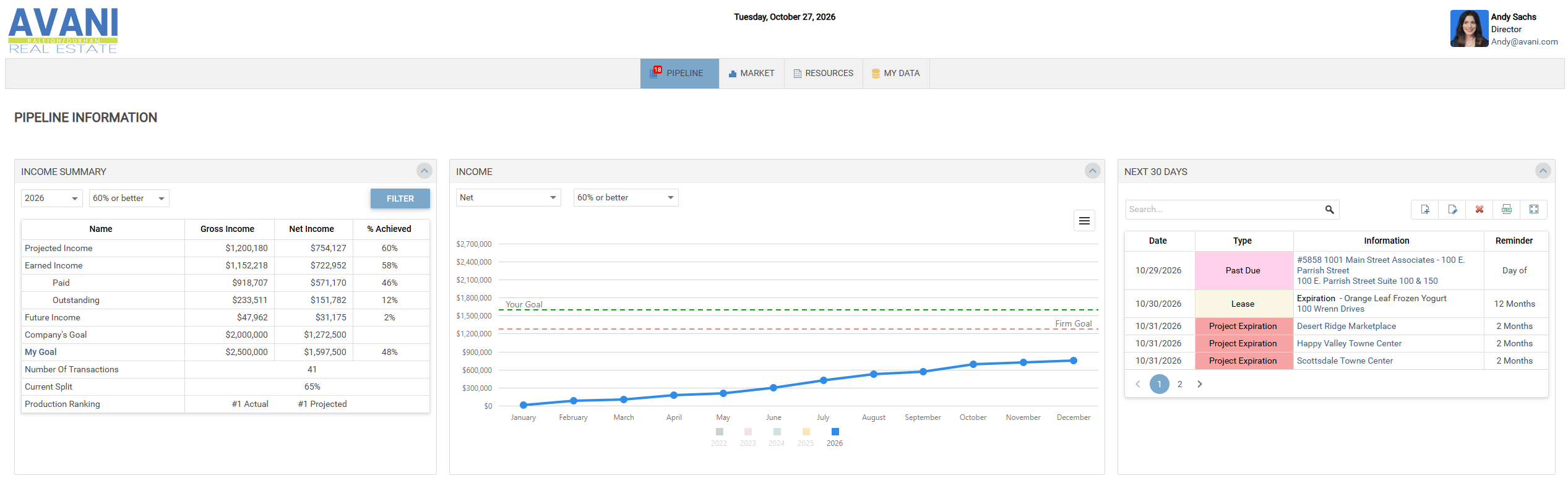
Back in May we wrote about the Next 30 Days box on your Pipeline page — how it fills itself in, how lease expirations and payment dates appear without anyone entering them, and how a follow-up date on a note lands there without you building a task.
All of that still holds. But there's a column in that box most agents have never looked at, and it quietly decides whether any of it actually helps you.
The Reminder Column
Look at the far right of the panel. Past the date, past the type, past the deal and property information, there's a column headed Reminder.
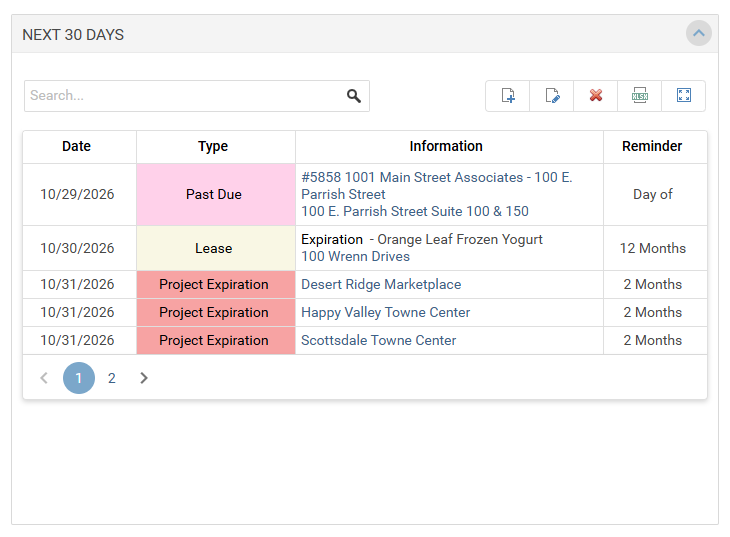
It isn't telling you anything about the deal. It's telling you about you — specifically, how much warning you asked for on that kind of event.
A lease expiration might read "12 Months." A project expiration might read "2 Months." A past due payment reads "Day of."
Read down that column and you're reading your own settings back to yourself.
Why "Day of" Is Sometimes Fine and Sometimes a Disaster
Think about what a reminder is actually for. It isn't there to tell you something happened. It's there to give you enough runway to do something about it.
A past due payment reading "Day of" is fine. The payment is already late. There was nothing to do in advance.
A lease expiration reading "Day of" is useless. By then the tenant has already decided. Somebody else called them in August.
And right now, for most agents, at least one row in that column is set to arrive too late.
Where That Number Comes From
Click your profile picture in the upper right corner, then click My Settings.
From there you choose which reminder types appear on your calendar at all, and how far ahead each one warns you:
- Lease expirations and renewal notices: 18 months, 12, 9, 6, 3 months, or at expiration
- Project and listing expirations: 3 months, 2 months, 1 month, or at expiration
- Sales dates: 1 month, 7 days, 3 days, or day of
Two things worth saying about those options.
If a reminder type is switched off, it isn't waiting quietly somewhere for you. It simply never appears. You won't notice you're missing it, because you'll never know it was there.
And the long intervals exist for a reason. Eighteen months on a lease expiration sounds absurd right up until you remember how long a renewal conversation actually takes in commercial real estate. Nine to twelve months is where most agents should sit. Three months is where most agents actually are.
Two Icons That Make This Easier
Five icons sit across the top of the panel: add a task, edit, delete, export, and expand.
Expand opens the calendar out to also show Company, Property, and the detail behind each entry. Worth doing once a week regardless of any of this.
Export pulls the whole list out of Realcore. If you're going to do the audit below, do it from an export — it's a lot easier to mark up a list than to squint at a panel.
Your Fifteen-Minute Q4 Audit
October is the month this pays for itself, for two reasons.
Every projected pay date between now and December 31 is a line in this year's production number. If one of them is wrong, or quietly past due, that money moves into next year and you find out in January while staring at an income summary wondering what happened.
And every lease expiration and renewal notice sitting in Q1 is next year's business, available to you right now, while your competition is at a holiday party. If your lead time is three months, you're seeing January and February today. If it's set to "At Expiration," you're seeing nothing.
So, this week:
- Open My Settings and turn on every reminder type.
- Set lease expirations and renewal notices to at least nine months.
- Go back to your Pipeline and read down the Reminder column. Any row reading "Day of" on something you'd have wanted warning about is a setting to go change.
- Chase anything marked Past Due.
- Go back through the notes you've left this month and put follow-up dates on the ones that need one. That's the single piece of this the platform can't do for you.
Fifteen minutes, once, and the box starts warning you early enough to matter.
What's Coming in Angelo
If you've seen a demo of Angelo, you've seen the Next 30 Days panel there, and it's a considerably bigger animal. The reminder types grow past a dozen, picking up termination notices and bill dates among others. And every entry becomes clickable — it takes you straight to the deal, listing, or task behind it, so the panel stops being a list you read and becomes a way to get around.
Follow-up notes get better too. The text of your note shows right in the row, so you don't have to open anything to remember why you flagged it, and follow-up dates you set from the Outlook add-in flow onto the calendar the same as the ones you set inside Realcore.
Same box, same spot on the page. A lot more in it — and the settings habit you build now carries straight over.
We're here to help! If you need help finding specific data, email us at support@realcoreapps.com or visit our Support Page for tutorials and more. And don't forget — this month's live trainings are happening soon. No RSVP needed, just join. You'll find dates, times, and links on our Monthly Training page.