

One of the most requested features coming in Angelo is finally here: the ability to assign more than one commission schedule per agent and change it deal by deal, invoice by invoice.
If you have ever had to manually override a payout because an agent's deal did not fit their standard commission structure — or if you have been waiting on a way to handle exceptions without creating workarounds — this update was built for you.
Here is what is changing and how it works.
A Quick Refresher: What Commission Schedules Do
Commission schedules are the engine behind how agents get paid. When a transaction reaches the Internal Review step, Realcore applies each agent's assigned commission schedule to calculate what they earn and what the company retains — payment by payment.
Schedules can be tiered. As an agent accumulates gross production throughout the year, they advance through tiers and earn a higher percentage on each payment. For example, a schedule structured as 50-55-60-75% means an agent earns 50% of their gross commission at the start of the year, and as they hit production thresholds, that percentage increases up through 75%.
Every agent is required to have at least one commission schedule assigned before any of their transactions can be closed. This has always been true — and it remains true in Angelo.
What Is New in Angelo: More Than One Schedule
Right now, each agent operates on a single commission schedule. If a deal comes in that does not match their standard arrangement, admins have to manually override the payout at the deal level. It works, but it requires more steps and adds room for error.
In Angelo, agents can have multiple commission schedules assigned to their profile. You set up each schedule in Administration → Commission Schedules, and when you assign agents, you can check them into more than one.
The Real Upgrade: Change the Schedule Per Deal, Per Invoice
This is the part that solves the real-world problem.
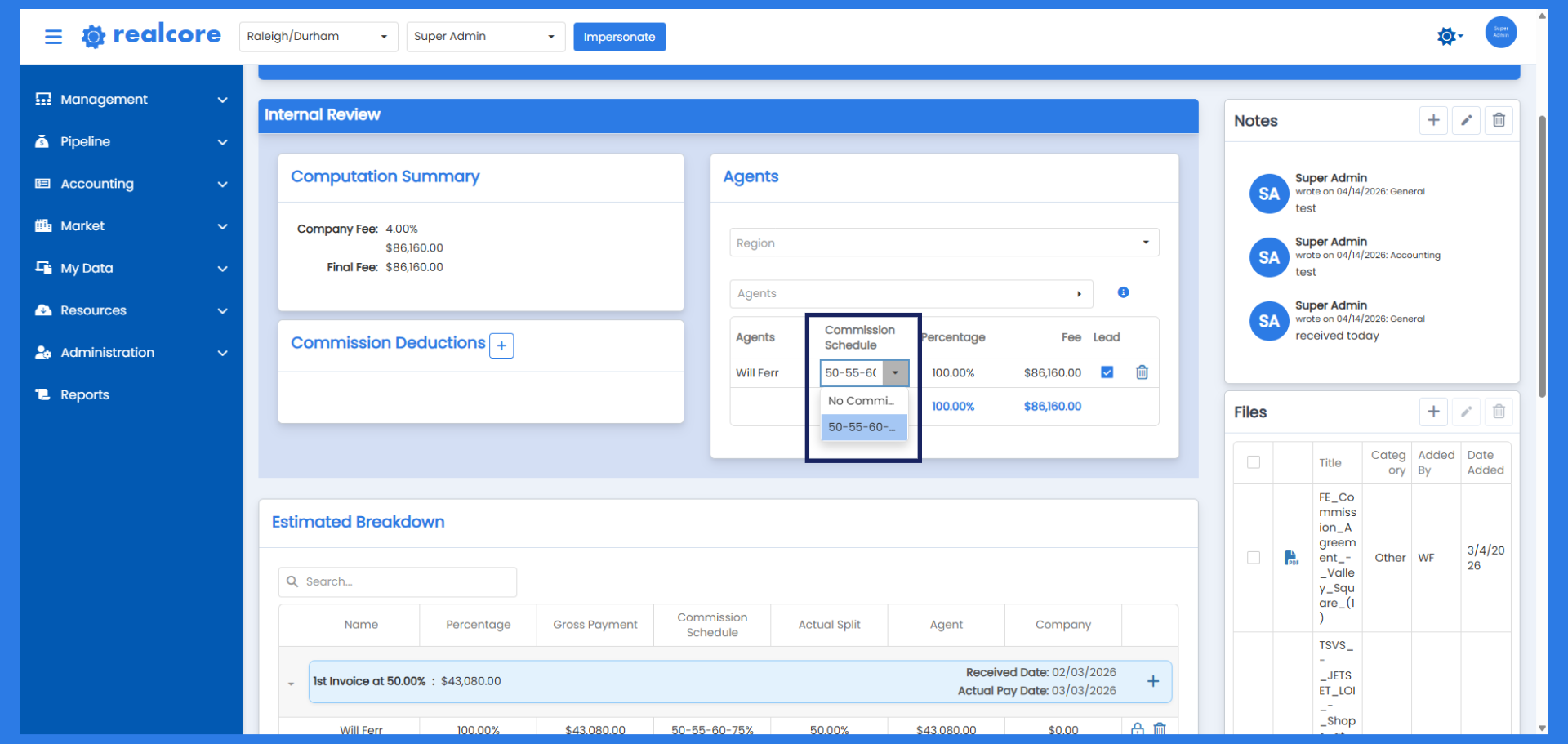
In Angelo, you will be able to select which commission schedule applies to a specific deal — and go further than that, changing it per invoice within the same deal. This means if an agent has a standard schedule for most transactions but a different arrangement for a particular deal, or if different payments within a deal carry different commission terms, you can handle all of it cleanly inside the system without any manual overrides.
This plays out in the Internal Review step of the Add Transaction workflow. In the Agents section, where you currently see the agent's assigned commission schedule displayed as a read-only reference, you will have the flexibility to apply the appropriate schedule for that deal. The Estimated Breakdown — which shows the payment-by-payment projection of what each agent earns and what the company retains — will reflect the correct schedule for each invoice accordingly.
Why This Matters
Commission exceptions are not rare. They come up regularly — agents with unique agreements, deals with non-standard terms, situations where the normal schedule simply does not apply. In the current system, every one of those situations requires a manual override. In Angelo, most of them will not.
The result is a more accurate system with less manual intervention, a cleaner audit trail, and fewer opportunities for a payout to be processed on the wrong schedule.
What You Should Know Before Angelo Launches
No action is required right now. Your existing commission schedules and agent assignments will carry forward. When Angelo launches, you will simply have the option to assign additional schedules to agents who need them and begin using deal-level schedule selection from there.
If you have questions about how commission schedules are set up or want to review your current schedule configurations before the update, reach out to our support team — we are happy to walk through it with you.
Stay tuned for more Angelo updates in the weeks ahead.