

Get one check that covers several deals? In the current version of Realcore, you have to process each payment on its own — one deal, one entry, over and over. It works, but it eats up your time. Angelo changes that.
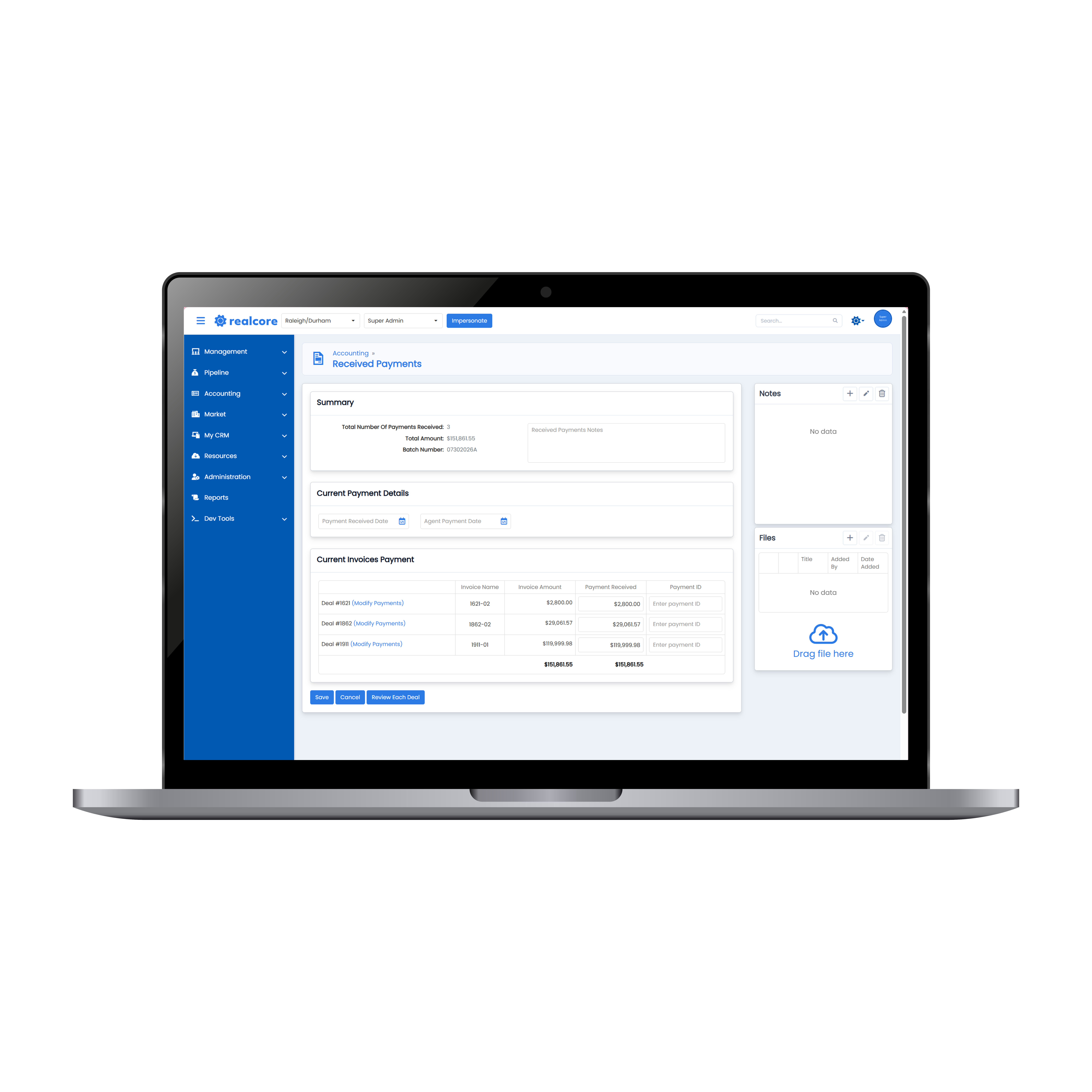
With Angelo, you can select multiple invoices and pay them all in a single batch. No more repeating the same steps for every deal on the check.
How it works
It starts on the Outstanding Invoices screen. Select the invoices you want to pay, then click Review Payments.
From there, Angelo automatically generates a batch number and displays the total amount received. You enter the check number and set the received and agent pay dates. If a payment doesn't cover a deal in full, you have the flexibility to modify deals and apply partial payments right in the batch.
Notes and files, attached to the right deal
The Notes Box and Filing Cabinet now include a dropdown, so you can pick a specific deal and attach notes or upload files directly into that deal's folder — all without leaving the payment screen. Everything lands where it belongs the first time.
Full detail on every deal
Each payment page gives you a complete overview of the payments tied to the deal, including outside parties. Before you finalize, you can review internal broker splits and deduct any agent expenses — deal by deal — so what you send out is accurate.
Batch payments is one of many time-savers built into Angelo. Let us know what you think!